23D - My favorite Key Features
Fusion Sales
Blog Owner and Author:
Cesar Guerrero

Hi everyone!
Today I am sharing my favorite updates from Fusion sales 23D. I am doing this to help me prepare for my delta exam. The following items are my personal favorites but there were many more updates which can be found here:
PROVIDE CONTEXT-DRIVEN OBJECT SUB-VIEWS BY INCLUDING OPPORTUNITIES FROM OTHER ACCOUNTS IN THE HIERARCHY BRANCH
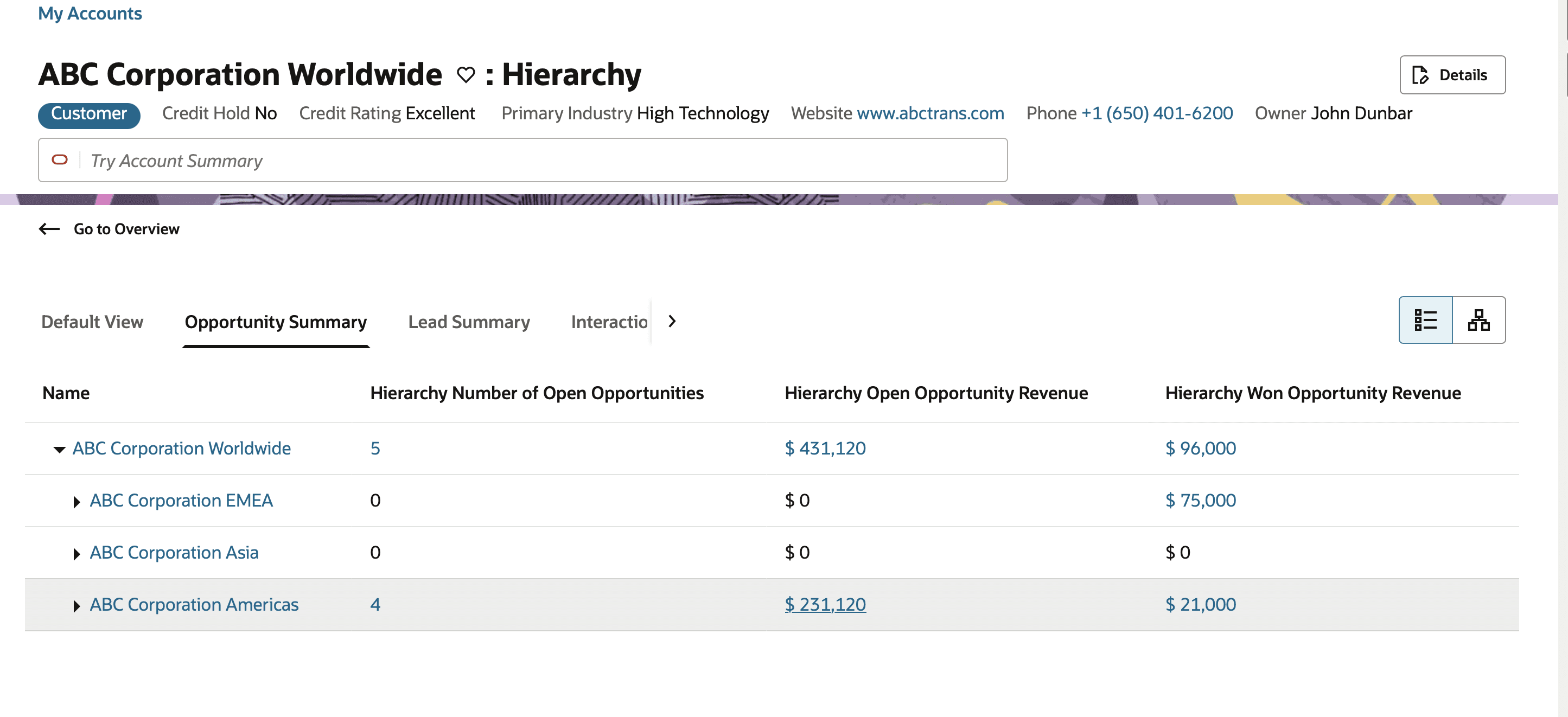
So what does this mean? In the past customers would select an account in a hierarchy and it didn’t matter if it was the parent or child account. The account would only display the opportunities associated to this account.
In this new update users will be able to view opportunities from child accounts in a parent account.
Why is this one of my favorite updates?! I recently worked on a project that was requesting different objects that could roll up from child accounts into accounts like opportunities. As I am more familiar with the classic UI I had to double check on this request. In the past this request would have been a no. However with this update I was happy to share with the team that it was possible and just needed to provide a demo.
From a configuration perspective. This feature is out of the box and does not need to be enabled. However it is recommended that the process, Refresh Denormalized Data for Account Hierarchy is scheduled so that the account hierarchies are refreshed.
Reference to update: https://www.oracle.com/webfolder/technetwork/tutorials/tutorial/cloud/r13/nfs/engagement/releases/23D/23D-sf-automation-nfs.htm#T50079
CAPTURE EMAILS SENT FROM CX SALES MOBILE USING MICROSOFT EXCHANGE INTEGRATION
As I reflect on How users use mobile. Usually it’s just to check accounts, and maybe activities but I have not seen it as something that fully replaces the desktop UI, or even the outlook UI. With this update I see the mobile application evolving from an app that is used to check on activities with light use to a mobile app that encompasses outlook integration capabilities. Based around my understanding of this feature users will be able to see emails sent, and the responses through a conversation thread. It is because I see this pushing the application to new heights that I am adding it to my favorites list.
Setup involves going to application composer and then entering the mobile application setup. Clicking into the application features area and going through the email settings and enabling, Capture Emails using Exchange Integration.
Admins will need to confirm that Exchange Email integration for Digital sales has been enabled before enabling the mobile integration.=
Read more about this update here: https://www.oracle.com/webfolder/technetwork/tutorials/tutorial/cloud/r13/nfs/engagement/releases/23D/23D-sf-automation-nfs.htm#T49514
ATTACH DOCUMENTS WHEN EMAILING CONTRACT
In contract management there is a section to attach contracts but prior to this update they were not sent with the contract for approvals. This limited recipients from seeing the contract in its complete state with attachments which could cause confusion or cause for an additional step. I can see this update improving the recipients user experience. With recipients receiving all of the components needed to review a contract, users should be able to expedite the approval process.
From an implementation standpoint there are no additional steps needed to enable the feature.
PROVIDE A SUMMARY OF CALLS TO LOG, ALLOWING USERS TO ENTER MEETING NOTES AND OUTCOME
On the insights page users will have a summary of calls to log. The goal of this feature is to help sales people improve logging meeting notes and action items.
To me this stands out as many businesses operate outside of the application when they have meetings, calls or appointments and captured minutes/notes keeps the team aligned. This feature helps with that.
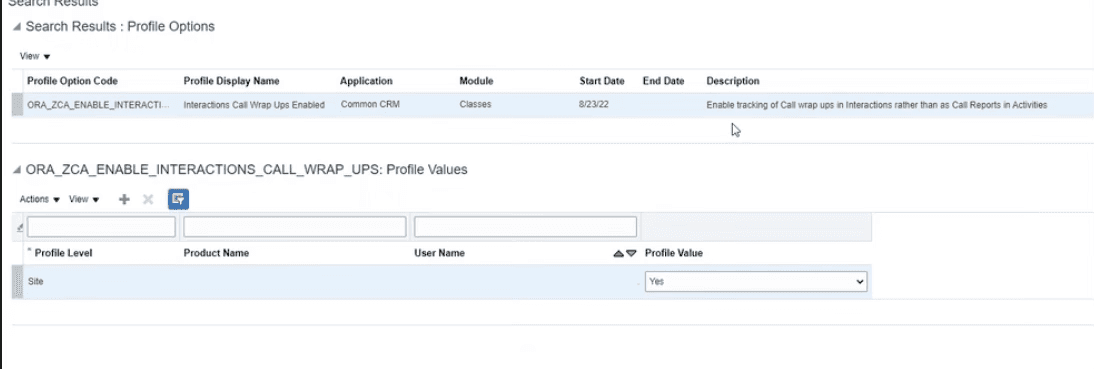
To enable uses will need to go to setup and maintenance, then search for, manage profile values and we will want to set the following profile values to yes:
Search the profile option code and set the profile value to Yes.
ORA_ZCA_ENABLE_INTERACTIONS_CALL_WRAP_UPS
ORA_ZCA_ENABLE_TRACKING_INTERACTIONS
After they are set to yes save your changes.
Link Duplicate accounts
This is by far my favorite update and I know I said being able to see opportunities on a hierarchy earlier but after further review this is my favorite update! But why is my favorite, because a majority of the implementations I have been on involve some kind of hierarchy and managing how we import or add past accounts is always a huge concern. In the past we were forced to do a forced merge where we grab the best values from rework accounts and get rid of what we would consider the duplicate. This is what is known as a hard merge. This update however enables us to offer a new solution to our customers where we can keep both the old account and the primary account and identify which one will be the primary account. But why would this be important? It would be important because sometimes some of these duplicate accounts include history or details that we may not want on the primary account but may want to reference at a later time. This was an excellent solution/alternative solution to a reoccurring problem.
There are no additional steps to set this option up however a Data Stewart Manager job role is required to link sales accounts to a duplicate account.
Final Thoughts
Overall this update had some hidden gems that I was really excited to learn about and am even more excited excited to implement. My top choices were chosen based on what I have seen impact users in previous implementation and am excited to continue to make these favorite feature blogs. Please let me know if there is a topic you’d like me write about and share my experiences.